Why Choose a Mechanical Gaming Keyboard?
A Mechanical Gaming Keyboard can change how a game feels, one keypress at a time. Its individual switches give players distinct feedback, whether that means a crisp click, a soft bump, or a quiet press. In a fast match, that sensation can help a player recognize an input without looking down. It is not a shortcut to better aim. Practice still matters.
Custom keyboard builder Tae Ha Kim’s work reflects a useful principle: “A keyboard should feel right under your hands.” That is a practical perspective, not a promise of improved performance. Switch choice, layout, keycap shape, and typing force all affect comfort. A loud click may feel satisfying in a gaming room, yet distract others nearby. Small details matter.
A mechanical model can also offer replaceable keycaps and a wide choice of switch types. Some designs support hot-swappable switches, making experiments easier. Still, more options can mean more decisions. That part is easy to underestimate. Before buying, consider the games you play, the sound you can tolerate, and how long your hands stay on the keys. A compact layout saves desk space but may hide familiar keys. The best choice is personal, and sometimes the first switch you try will not suit you. That is normal. This guide explores what mechanical keyboards offer, where their advantages are real, and what trade-offs deserve a closer look.
What Defines a Mechanical Gaming Keyboard?
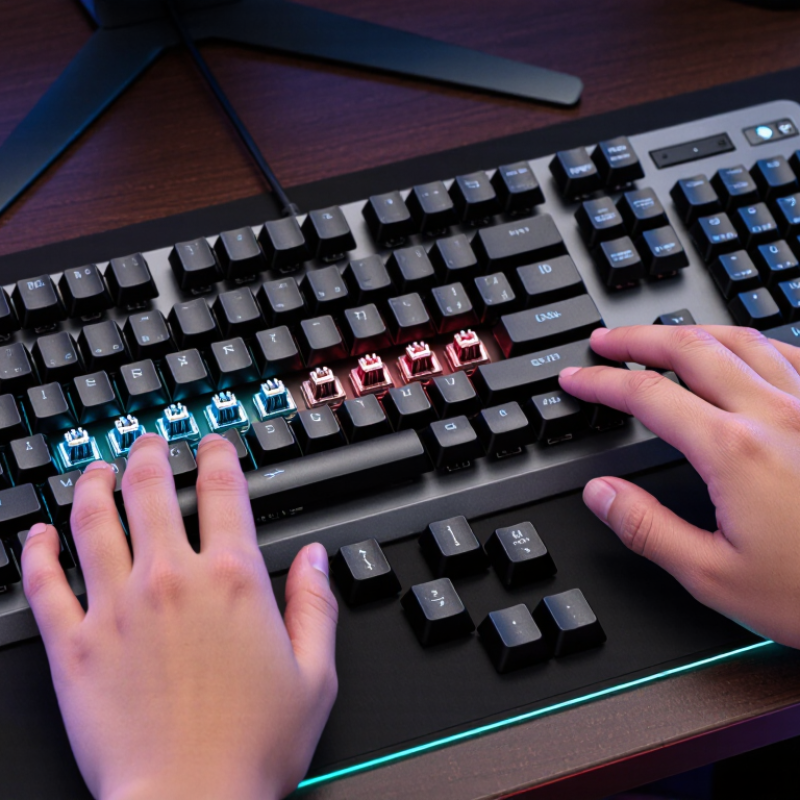
A mechanical gaming keyboard has an individual switch beneath each key, rather than a shared membrane layer. Inside each switch, a spring returns the key after a press, while metal contacts register the input. The switch’s shape and mechanism influence how much force, travel, and feedback each keystroke requires. That is the core. Some switches feel light and smooth; others give a noticeable bump or audible click. Noise and feel vary, so “mechanical” does not describe one single typing experience.
The measurements matter. RTINGS’ keyboard testing methodology evaluates switch actuation force and pre-travel. Many common switches actuate at roughly 2 mm of travel and need about 45–60 gram-force, though these are typical figures, not a universal standard. A shorter actuation point may feel quick, but it does not automatically improve accuracy. On a desk, a switch that is too sensitive can register accidental presses. The distinction is real; the best feel is personal.
Tips: Check the switch’s force and travel figures before choosing. If possible, test a few switches, listening for noise and noticing finger fatigue. A spec sheet cannot capture everything. My own preference might change after a long session, which is worth remembering.
Why Choose a Mechanical Gaming Keyboard? — What Defines a Mechanical Gaming Keyboard?
| Dimension | What Defines a Mechanical Keyboard | Why It Can Matter for Gaming |
|---|---|---|
| Key mechanism | Each key generally uses its own mechanical switch, with a spring and moving parts that register a press. | Keys can provide distinct, consistent-feeling presses. The exact feel depends on the switch design and keyboard. |
| Switch feel | Switches may feel linear, tactile, or clicky. These terms describe how a press feels and sounds; implementations vary. | Players can choose a feel they find comfortable for repeated key presses. No one switch type is best for every player. |
| Actuation | A switch can register a key before the key reaches the bottom of its travel. Actuation distance and force vary by switch. | A lighter or shorter-actuation switch may feel responsive, but it does not by itself guarantee lower overall input latency. |
| Input rollover | Rollover describes how many simultaneous key presses a keyboard can register. It depends on the keyboard’s electronics and design. | For games that use several keys at once, check the stated rollover or key-registration specifications rather than assuming every mechanical keyboard supports the same number. |
| Latency | End-to-end keyboard latency depends on factors such as scanning, firmware, connection, and the computer—not just the switch mechanism. | Compare measured or published latency for the specific model. Mechanical construction alone does not ensure faster response. |
| Durability | Switches are commonly rated for a specified number of presses, but ratings vary and are not a guarantee of a particular service life. | A rated switch life can help with product comparisons. Keycaps, stabilizers, electronics, and usage conditions also affect longevity. |
| Noise | Sound varies with switch type, keycaps, keyboard construction, and typing technique. Clicky switches are designed to make an audible click. | Consider the playing environment and other people nearby. Mechanical keyboards are not automatically louder or quieter than every other keyboard. |
| Customization | Some models allow keycap changes; switch replacement is possible only on compatible hot-swappable boards or through soldering. | Check compatibility before buying parts. Customization can change feel and appearance, but it is not a feature of every mechanical keyboard. |
| Price and value | Mechanical keyboards are available at a range of prices and are often more expensive than basic membrane models with similar layouts. | Choose based on features you will use—such as layout, feel, build, and connectivity—rather than the mechanical label alone. |
| Best fit | A mechanical keyboard is defined primarily by its individual mechanical key switches, not by gaming software or appearance. | It may suit players who value a particular switch feel, key rollover specifications, or repair and customization options. Personal preference remains important. |